Simple ffmpeg UDP Video Streaming (from BeagleBoard running Ubuntu)
In ARM Linux, Ubuntu on 5 November 2012 with no comments  16309 views
I really mean simple, this is a one command line UDP stream from the BeagleBoard (running Ubuntu ARM) to my desktop (IP address 192.168.1.19 in this example), the source video is an FLV file inside the ARM-board:
$ ffmpeg -i UNIQLO_MIXPLAY.flv -v 0 -vcodec mpeg4 -f mpegts udp:192.168.1.19:1234
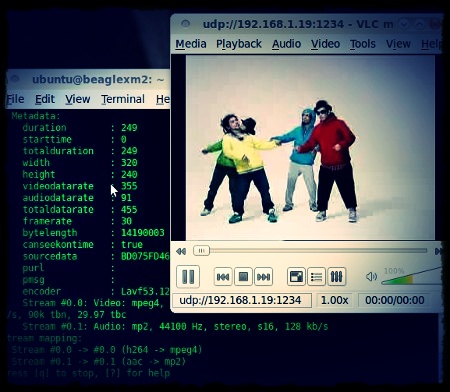
ffmpeg streaming from BeagleBoard played by VLC on the desktop
Although it’s a break-dance video, it plays uninterrupted, without any break.
Here is how my desktop see the stream with VLC player:

VLC setup (on the desktop) to play the UDP stream
With less documentation, a more complex setup with integration to Wowza Media Server is available on my github.
About
+Arif Kusbandono
Recently
Et Cetera
© logIt. Powered by WordPress using the DePo Skinny Tweaked Theme.